The model is designed to operate across different levels of control while consistently delivering outputs aligned with design-level quality and visual intent. You can describe intent briefly or define constraints in detail — both approaches are valid and produce stable results. In some cases, a short prompt is sufficient to explore form, mood, or composition. In others, longer prompts allow you to define structure, style systems, typography behavior, or production constraints. This guide focuses on practical usage: how prompt length, structure, and level of detail affect output — and how to choose the appropriate approach for different design tasks.
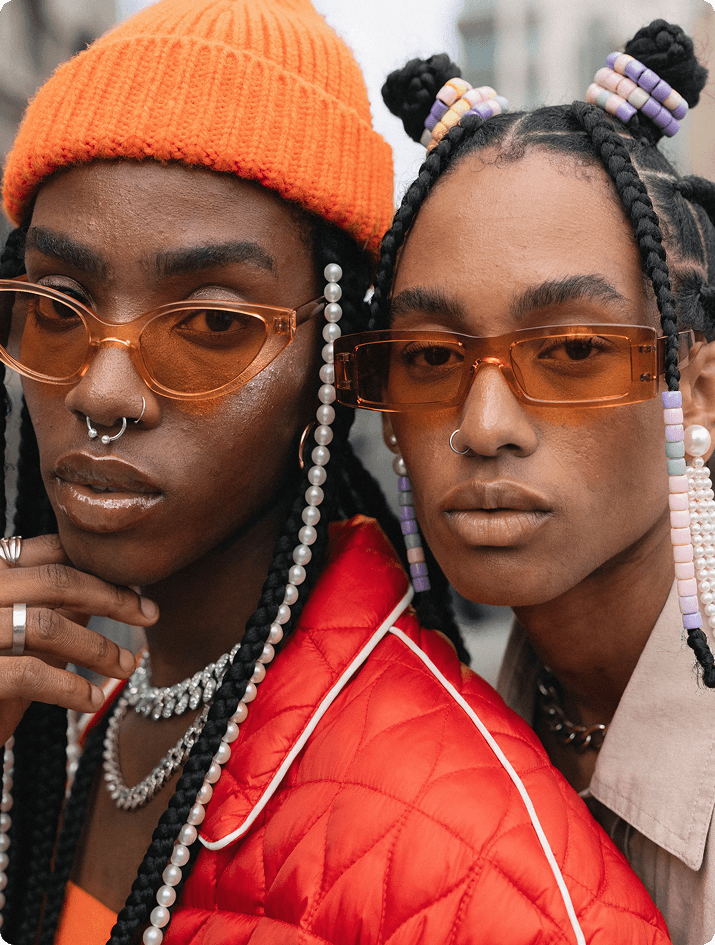
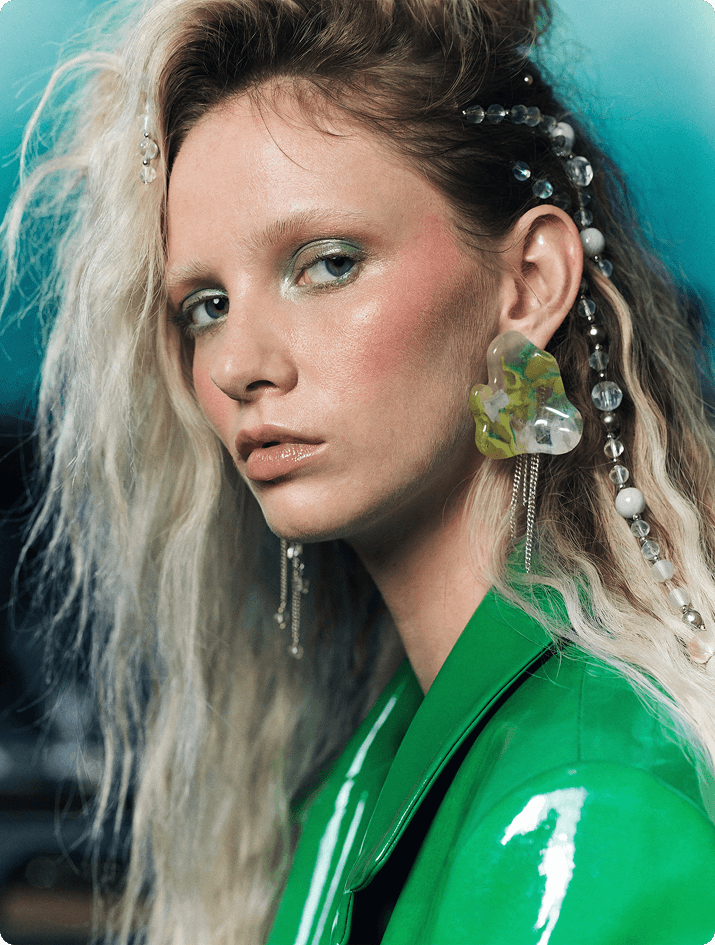
Short prompts → Interpretive mode
Recraft is capable of making informed aesthetic decisions when provided with minimal input.
PROMPT
Fashion couple portrait, close up.
PROMPT
Fashion portrait, close up.
Structured prompts → Architectural control
If you want precision, define the visual system.
PROMPT (click to expand)
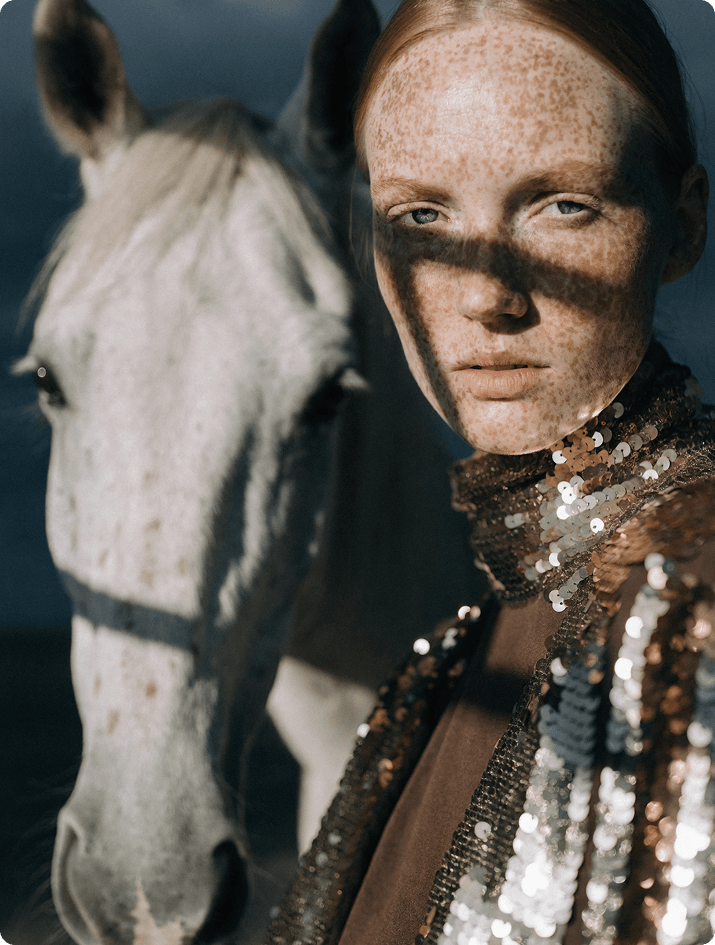
Artistic close-up portrait of a young Caucasian woman and a pale horse against a dark desaturated blue-grey background with subtle vignetting. The woman stands on the right in sharp head-and-torso focus, slightly angled left, looking directly into the camera with a serious, neutral expression. Fair freckled skin, light reddish-brown hair pulled back, light eyes, no jewelry. She wears a high-neck metallic gold sequined garment over a dark brown layer, reflecting soft golden highlights.
In the left foreground, slightly behind her, the pale horse’s head is softly out of focus but clear in form — white coat with faint speckles, light mane, visible eye, no tack. Strong natural light from the upper left creates sharp diagonal shadows and warm highlights against the cool background. Shallow depth of field, high contrast, eye-level composition, asymmetrical and intense mood.
PROMPT (click to expand)
Prompt Hyper-realistic aerial wildlife photography capturing a calm, graphic close-range moment of five horses gathered in shallow water, viewed from a perfect 90° top-down perspective. The framing is tight: their heads, necks, and upper backs fill most of the frame, emphasizing scale and physical presence. The horses stand very close together in a loose, imperfect circular arrangement with organic spacing — not mathematically symmetrical. Some heads angle slightly inward while others tilt subtly off-center, creating a spontaneous, natural composition. They are calm and still, gently lowering their heads toward the water. The horses are completely natural with no reins, bridles, or harnesses; manes flow freely and appear slightly damp at the edges.Clear shallow water fills the entire frame with no shoreline or external elements visible. The palette is deep and cool: water rendered in rich sapphire blue with soft indigo gradients and muted silver reflections from sunlight. Horse coats appear in cool, desaturated tones — ash gray, charcoal brown, cool slate, and muted chestnut with subtle bluish undertones. Fine ripples form around each muzzle, with slight distortion visible beneath the water surface. Bright, even natural daylight creates soft reflections and gentle highlights across wet coats. Ultra-high-resolution photorealism with visible mane strands, subtle coat variations, and a slight wet sheen on their backs. The composition remains minimal and graphic, with subtle negative space in the center and a mood of natural calm, organic imperfection, quiet unity, and serene strength. No text, no logos, no references.
Prompt structure (from global to local)
Core concept — subject(s) and scene (who and what is in the image)
Background and environment (where the subjects exist)
Primary subject framing and pose (pose and expression)
Physical attributes and identity details (identity and appearance)
Secondary subjects and spatial relationships (if needed)
Lighting direction and behavior
Camera, depth, and contrast (how the scene is captured)
Mood and compositional resolution
Key takeaway
Structured prompts don’t make results “better”. They make outcomes intentional, controllable, and repeatable.
Practical tips
If the image must match a specific art direction → structure the prompt.
If you’re exploring → keep it minimal.
Designer cinematic
Cinematic imagery is not about drama — it’s about control.
PROMPT (click to expand)
Cinematic portrait photography, natural light, dark atmospheric. A young woman sitting cross-legged on the floor in the corner of a completely dark room, back against the wall, face tilted upward. On the wall behind and above her: extraordinary caustic light patterns — shifting organic shapes of cold blue-white and pale teal light moving across the wall surface as if projected by water or glass, the patterns constantly implied in motion, wrapping around her figure and the corner of the room. The light source completely invisible — the patterns appearing from nowhere, covering the wall in luminous abstract forms that look simultaneously natural and impossible. Her face catching fragments of the shifting light — one cheekbone lit in cold blue, the rest of her in deep shadow. The floor around her also catching scattered light fragments. She is not afraid. She is watching something above her that we cannot see. Color palette: cold electric blue-white caustic patterns, deep teal shadows, pure black room, pale skin fragments. Shot on available light only. The feeling: something has entered the room through the walls.
PROMPT (click to expand)
Interior scene in a vast ultra-modern penthouse overlooking a sprawling futuristic megacity, a floor-to-ceiling panoramic window spanning the entire wall, with a lone figure in silhouette observing massive multi-level air traffic — large hovering carriers, drones, and distant convoys moving through layered city airspace. Heavy overcast sky with dense atmospheric haze, diffused daylight blending with subtle artificial glow, soft volumetric light cutting through fog, low contrast between cool exterior tones and dim interior shadows. Ultra-wide cinematic framing from a slightly low angle using a 24–28mm lens emphasizes monumental scale and spatial depth, with the interior foreground framing the expansive exterior. Outside, layered motion unfolds — slow drifting structures, steady traffic streams, distant blinking lights — contrasted by stillness inside. Endless skyscrapers fade into atmospheric perspective, the skyline dissolving into fog, creating strong separation between the silhouette and the vast environment. Controlled cinematic palette of cold grays and steel blues, punctuated by warm amber accents, conveying a mood of epic scale and quiet futurism — isolation within a vast, living system.
Prompt structure
Scene type (studio, street, landscape, interior)
Main subject (person, object, action)
Lighting setup (natural, directional, time of day, contrast)
Camera language (angle, lens, framing)
Motion treatment (freeze, blur, long exposure, wind, gesture)
Color palette (controlled tones, cinematic grading)
Logic
Cinematic quality = light + camera + motion control. Describe how the image is captured, not just how it feels.
Designer lifestyle
Lifestyle works when it feels unforced.
PROMPT (click to expand)
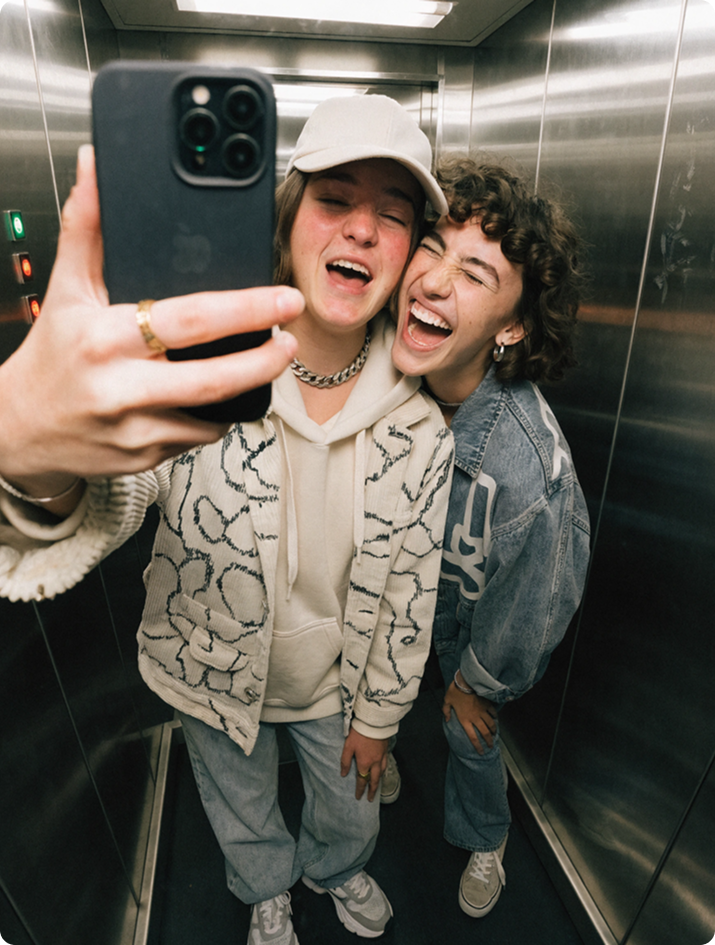
Casual everyday moment inside a small elevator, two young people taking a spontaneous mirror selfie together, laughing and messing around, one holding the phone while the other leans in close from behind. They wear casual streetwear — a cap, jacket, hoodie — slightly mismatched and unstyled. Harsh overhead elevator light creates uneven illumination with soft shadows and slight grain, typical phone camera look. Shot directly into the mirror, centered but imperfect framing with fingers partially covering the phone, slight blur and compression artifacts. Background is minimal — metallic walls, tight space, reflections. Mood is playful and unfiltered — a quick, intimate moment between friends captured without thinking.
PROMPT (click to expand)
Everyday urban street scene during late afternoon in a busy city, a young man walking through a crowd on a sidewalk wearing simple office clothing — shirt, tie, jacket, and headphones — moving naturally with hands in pockets, not posing, just passing through. Casual, slightly unpolished look with lightly wrinkled clothing and no styling. Natural sunlight from behind creates warm glare, mild overexposure, and uneven lighting across the frame. Shot handheld at eye level with a candid feel, slightly off-center, with mild motion blur from passing pedestrians and imperfect focus on the subject. The background is messy and layered with people, buildings, and street activity, with no strong separation. Real-world details like long shadows, uneven pavement light, and random figures mid-step. Mood of routine and detachment — an ordinary, unfiltered moment of city life.
Prompt structure
Context (everyday scenario, environment, setting)
Main subject (person, group, product in use)
Action or interaction (natural behavior, not posed)
Lifestyle = authenticity + context + behavior. The scene should feel observed, not constructed.
Vector & logo design strength
Recraft V4 is unusually strong at flat graphic logic.
PROMPT (click to expand)
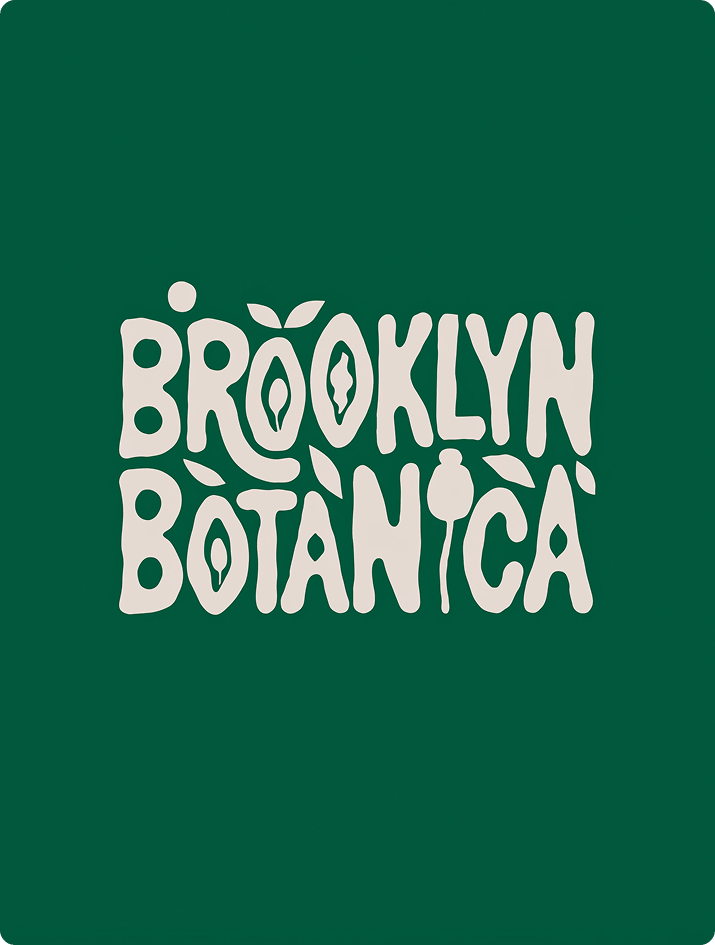
Minimal playful logo on a deep muted green background with warm off-white or cream elements. Flat colors only — no gradients, shadows, or texture. Designed for a slow, nature-focused creative space such as a studio, independent publishing project, or mindfulness platform. Calm, grounded, human, slightly whimsical — never commercial or trendy. Bold hand-drawn chunky wordmark with soft uneven strokes, rounded edges, imperfect spacing, and slightly irregular proportions. Letters feel brush-painted or cut from paper, earthy and intuitive rather than precise. Simple plant-inspired symbols (abstract leaves, berries, seeds) are integrated into or around the lettering — flat, bold, highly simplified shapes with no outlines or fine details. Centered, compact composition forming one unified silhouette with strong legibility. Warm, natural, quietly confident identity. Avoid corporate aesthetics, sharp geometry, thin lines, decorative fonts, or tech styling.
PROMPT (click to expand)
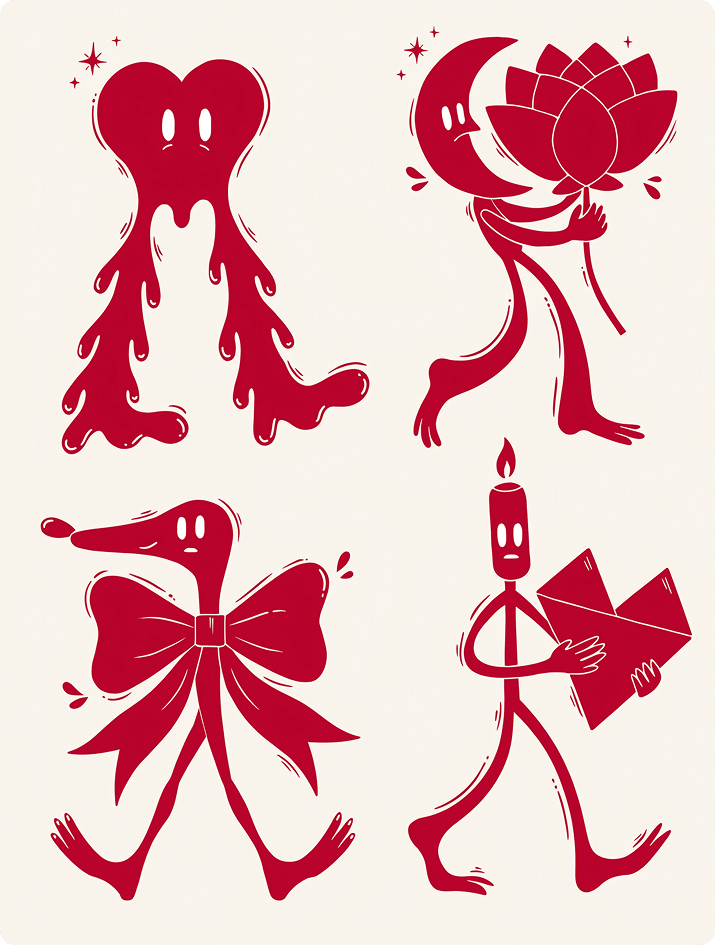
Clean modern illustration icon set featuring exactly 4 ultra-bold surreal character pictograms in a playful contemporary mascot style. Exaggerated geometric bodies, elastic limbs, dynamic confident poses, slightly asymmetrical forms, smooth hand-drawn outlines with a subtle wobble. Minimal facial features — small oval eyes, calm neutral expressions. Personality expressed through posture. Strict two-tone palette only: deep saturated crimson for all characters and graphic elements on a soft warm cream background. Flat vector aesthetic. No gradients, no shading, no texture, no shadows. Include exactly four characters: — A tall melting heart with long flexible legs walking forward. — A floating crescent-moon-headed figure hugging a large abstract flower. — A stretched dachshund-like creature with an oversized bow around its body. — A tall matchstick-headed character with a tiny flame-shaped head holding a large geometric love letter. Add minimal decorative elements in the same crimson line style: small starbursts, abstract leaves, curved motion lines, and floating petals. Clean, balanced, poster-style composition with strong negative space. No text. No clutter. Bold, graphic, collectible art-print aesthetic.
Practical tips
Avoid texture or material-focused language. Vector output responds to structural definition and geometric clarity. For logo and vector design, prompts should define:
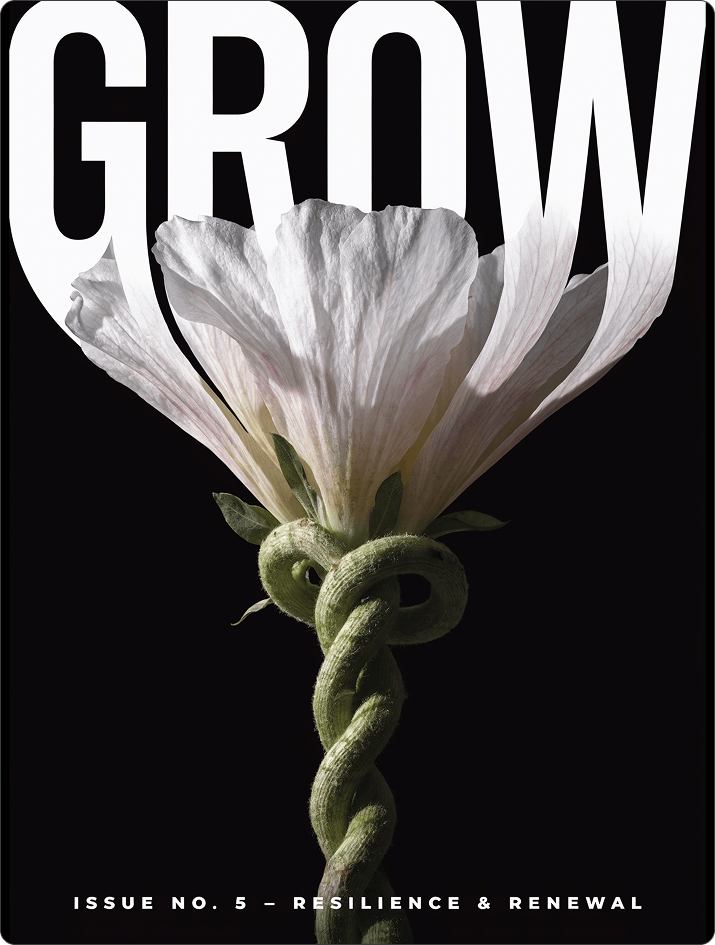
Editorial magazine cover poster. Minimal black background. A realistic flower viewed from below grows upward through the composition, with a thick twisted green stem, small leaves, and soft white petals with subtle pink and yellow tones. The flower passes through the typography, petals spreading behind and between the letters.
Oversized white uppercase sans-serif headline “GROW” tightly cropped at the top, heavy condensed letterforms dominating the upper half. The lower edges of the letters subtly morph and flow into the flower, visually transitioning into the twisted stem. Strong contrast between solid white typography and delicate botanical detail.
Clean modernist grid layout, strong vertical composition with intentional overlap. Add a small refined sans-serif text block “ISSUE NO. 5 – RESILIENCE & RENEWAL” placed at the bottom center of the layout. Quietly powerful, poetic, contemporary editorial aesthetic. High-resolution, print-ready magazine cover.
PROMPT (click to expand)
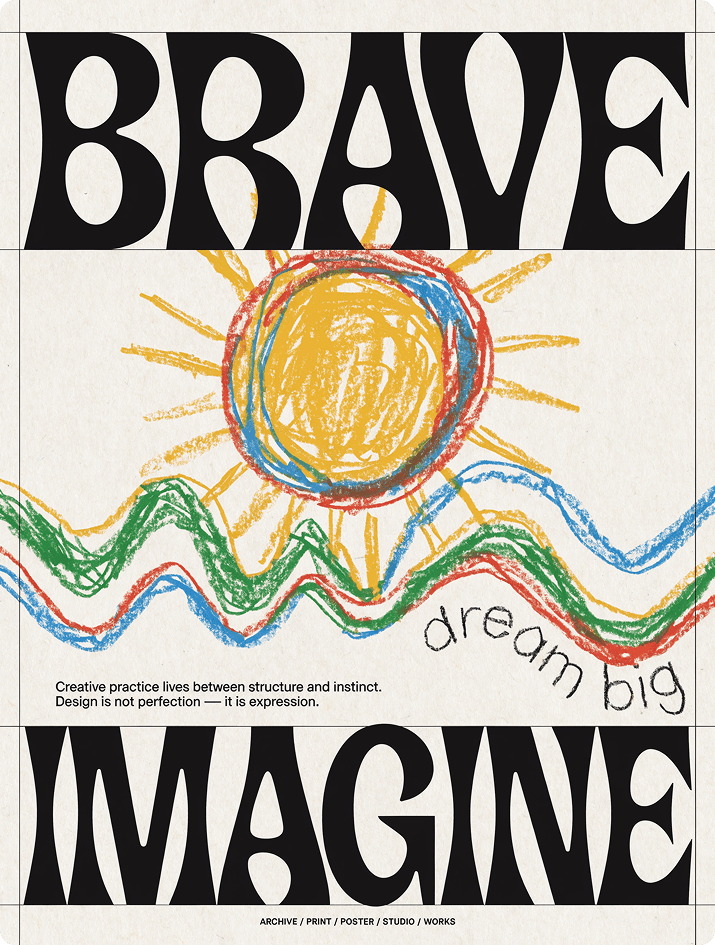
Large-format contemporary graphic design poster combining raw editorial typography with expressive childlike crayon illustration. Warm off-white background with subtle paper grain and a strict grid layout defined by thin black frame lines and vertical divisions. At the top, an oversized tightly kerned bold black word in heavy grotesque sans-serif reads «BRAVE». The center features a naive crayon drawing of a large sun and abstract landscape, made with thick wax strokes in saturated yellow, red, sky blue, and grass green, with uneven pressure and energetic scribbles. The drawing overlaps the grid and typography. Handwritten crayon text near it reads «dream big». At the bottom, another oversized bold word reads «IMAGINE». Between the illustration and lower headline, a narrow vertical column of small clean sans-serif text states: «Creative practice lives between structure and instinct. Design is not perfection — it is expression». Footer in small uppercase sans-serif: «ARCHIVE / PRINT / POSTER / STUDIO / WORKS». Brutalist black typography meets playful crayon art, flat colors, strong contrast, subtle paper texture — structured yet expressive and slightly rebellious.
This is where Recraft V4 becomes especially powerful for designers. It demonstrates a clear understanding of typographic hierarchy, visual weight, and poster-scale composition. When layout logic is explicitly described, the model responds with accurate and predictable results.
Prompt structure
Format and scale (poster, cover, large-format)
Background / visual layer
A Graphic or image layer B
Typographic hierarchy (what is the largest?)
Text placement logic (top, center, edge, curved, cropped)
Contrast between layers
Overall compositional mechanics
Recraft builds the layout instead of randomly placing elements.
Practical tip
For hybrid posters (photo + graphic) define each visual language separately, then describe how they interact.
Experimental graphic poster
PROMPT (click to expand)
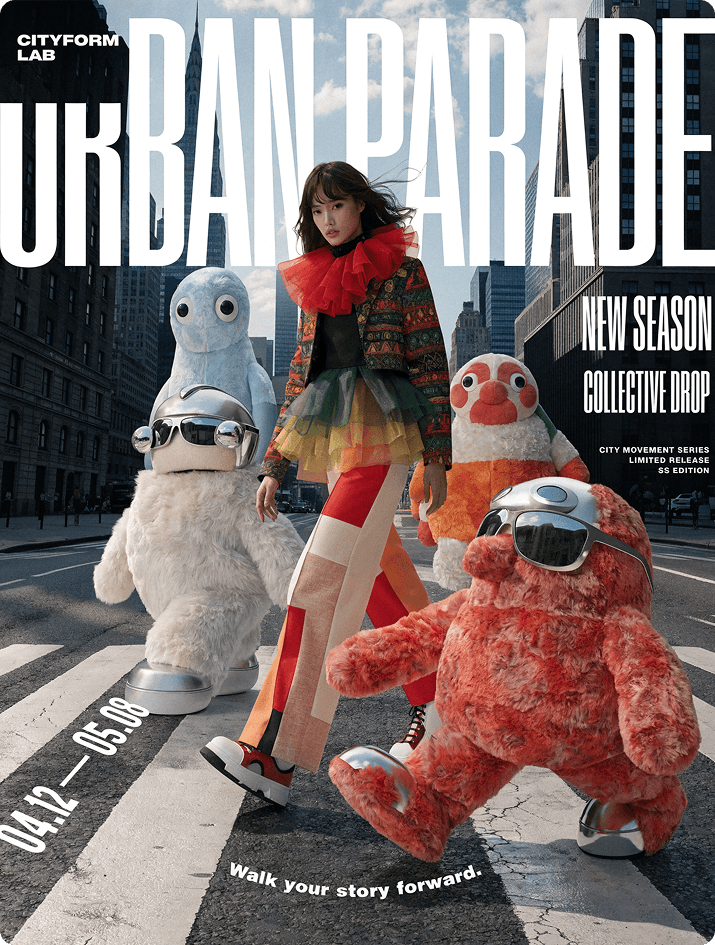
Contemporary fashion campaign poster blending realistic street photography with hyper-detailed 3D characters and bold experimental typography. A wide pedestrian crosswalk in a modern city under soft daylight — detailed asphalt, crisp zebra stripes, natural shadows, cinematic grading. A young avant-garde stylist walks confidently left to right, slightly off-center, captured in documentary realism with wind in the hair and a layered experimental outfit of saturated tones, technical fabrics, metallic accents, and structured tailoring. Plush-tech hybrid mascots move in the same direction along the stripes — one leading, one strong in the foreground, two behind at staggered depths — with ultra-real fur, glossy plastic and chrome details, and precise shadows aligned to the crosswalk. Seamless blend of real photography and CGI. Bold layered typography: “URBAN PARADE” oversized across the top, partially cropped; “NEW SEASON” and “COLLECTIVE DROP” as strong blocks on the right; date “04.12 — 05.08” in perspective along a stripe; curved tagline «Walk your story forward.» near the ground; compact “CITYFORM LAB” logo in the corner. Add large glossy sticker graphics — circular “EXCLUSIVE DROP”, rectangular “STREET EDITION”, diagonal “LIMITED RELEASE”. Strong asymmetry, unified motion, high-fashion meets collectible culture, dynamic editorial poster energy.
PROMPT (click to expand)
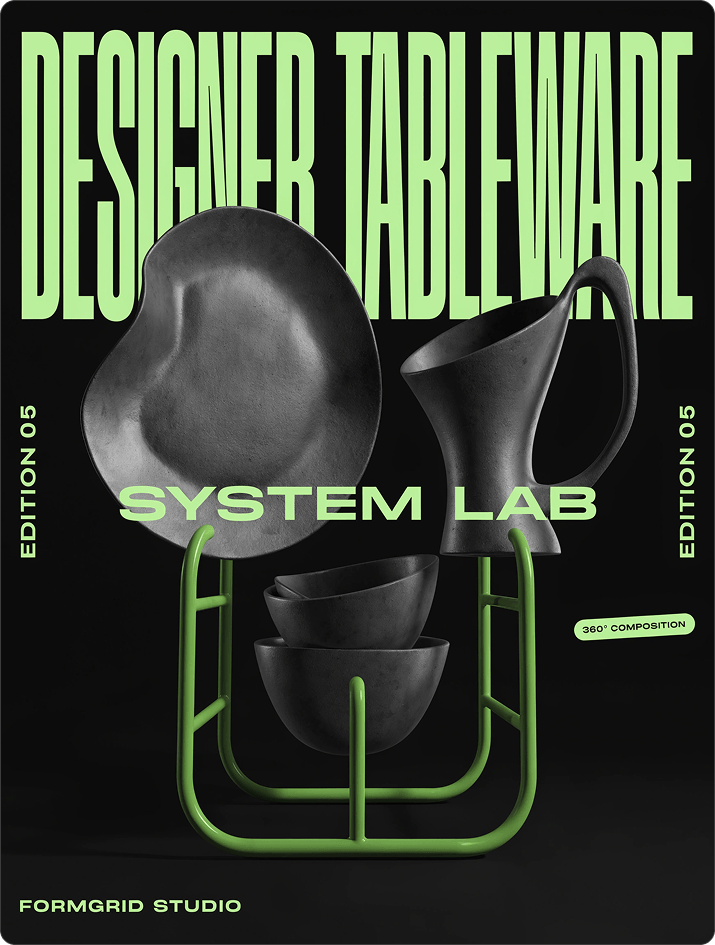
Bold futuristic product poster combining high-contrast 3D objects with oversized graphic typography. Deep matte black background with all typography in bright electric lime green, ultra-large condensed sans-serif, tightly spaced and partially overlapping, acting as an architectural grid behind the objects. The main concept is an avant-garde designer tableware collection: a single sculptural neon-green powder-coated metal rack structure floats in sharp perspective, displaying a very limited number of highly unusual pieces — one asymmetric fluid-geometry ceramic plate, one tall sculptural cup with an exaggerated curved handle, and one small stack of two organically shaped bowls. The forms are smooth matte ceramic with soft subtle reflections, engineered precision, rounded edges, collectible and artistic rather than purely functional. The objects are carefully spaced with strong negative space, beautifully arranged in an asymmetrical gallery-like composition, balanced and visually refined. Top oversized headline reads “DESIGNER TABLEWARE”, with a second large line crossing the composition: “SYSTEM LAB”. Vertical side typography reads “EDITION 05”. A small rounded badge states “360° COMPOSITION”. Corner logo in clean uppercase sans-serif reads “FORMGRID STUDIO”. Style balance: heavy typography as structural backdrop, minimal sculptural 3D ceramics in sharp perspective, neon green on deep black, clean modern industrial-art aesthetic, bold minimal poster design. Overall mood: experimental design culture — collectible dining objects presented as rare sculptural industrial art.
Prompt structure
Core scene or subject Additional 3D / graphic elements
Recraft V4 is highly capable in stylized and narrative illustration.
PROMPT (click to expand)
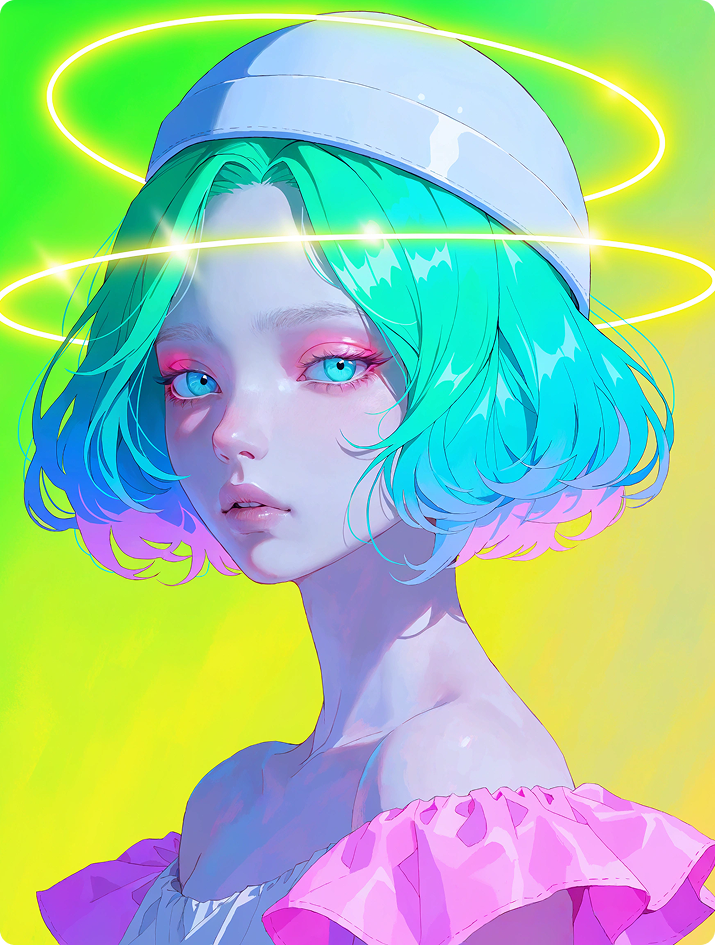
Digital anime-inspired neon-lit illustration of a young female from the shoulders up with pale luminous matte skin, short bob-length hair in voluminous rounded layers slightly wavy with a neon gradient of green, cyan, blue, and pink reflecting light. Large almond eyes with bright cyan irises and darker cyan or black pupils, neon-pink eyeshadow on the upper lids, faint eyelashes, faint or absent eyebrows, gaze directed slightly downward and to her right (viewer’s left) with a neutral expression and muted pink slightly parted lips. She wears a white close-fitting rounded helmet-like cap with subtle highlights and a wide raised band around the forehead, along with an off-shoulder garment featuring a puffy neon-pink ruffled shoulder piece on the right shoulder. Her head is tilted slightly to her right (viewer’s left). Two semi-transparent glowing neon-yellow halo rings surround the cap and hair. Three-quarter view, turned slightly to her right. Background is a smooth out-of-focus gradient transitioning from neon green and yellow-green at the top.
PROMPT (click to expand)
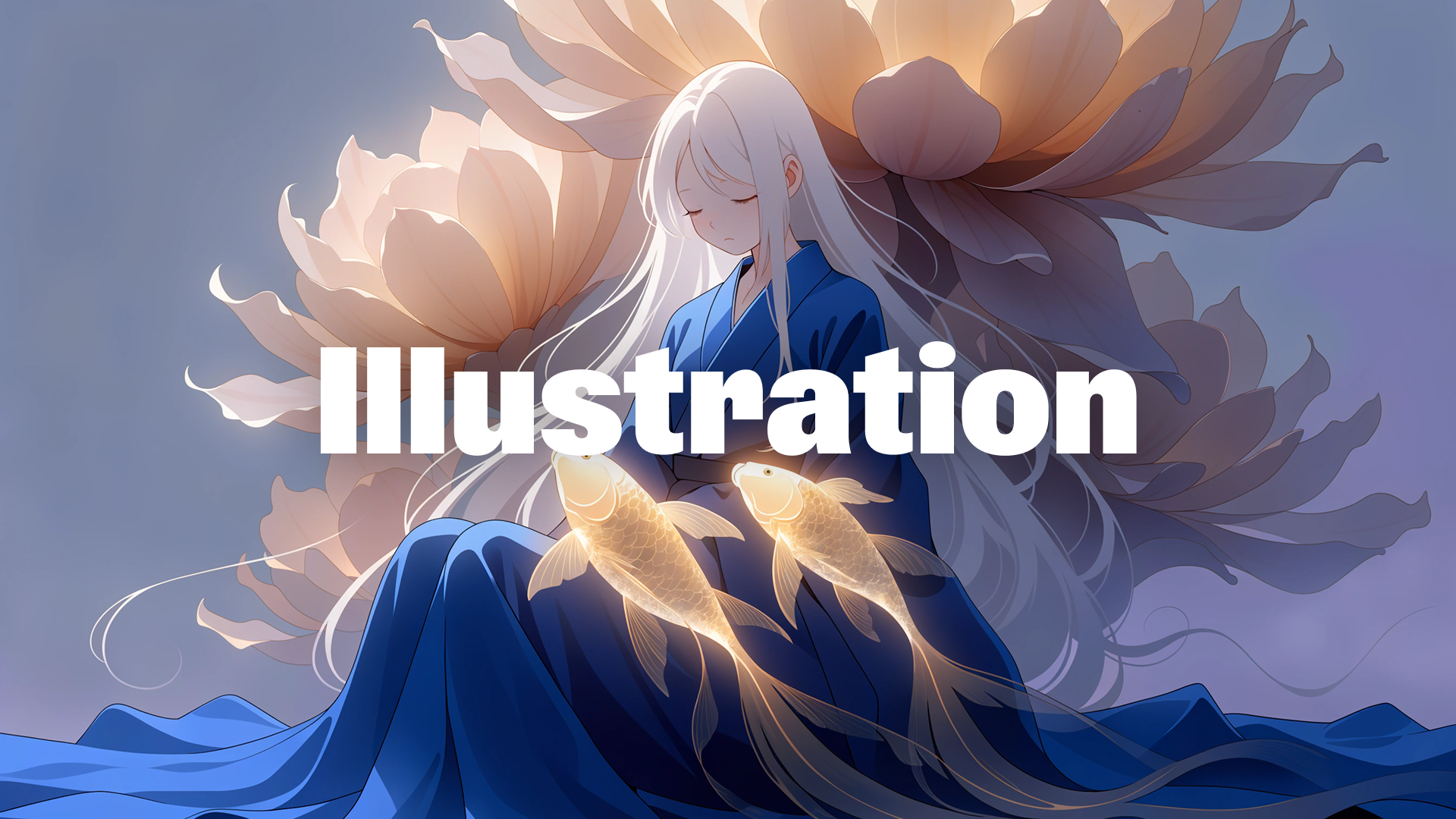
Soft glowing composition of a giant cat-like spirit shape looming behind a tiny simplified human figure. Both forms are built entirely from smooth glowing gradients without outlines or texture. The cat silhouette transitions between deep navy, electric violet, muted magenta, and pale cyan light, while the tiny figure glows softly in coral pink and warm cream tones. The entire scene dissolves into a fog-like blue-lavender atmosphere with no visible surface detail or sharp boundaries. Airy emotional mood, ultra-clean rendering, no grain, no texture, only soft luminous transitions and floating dreamlike gradients.
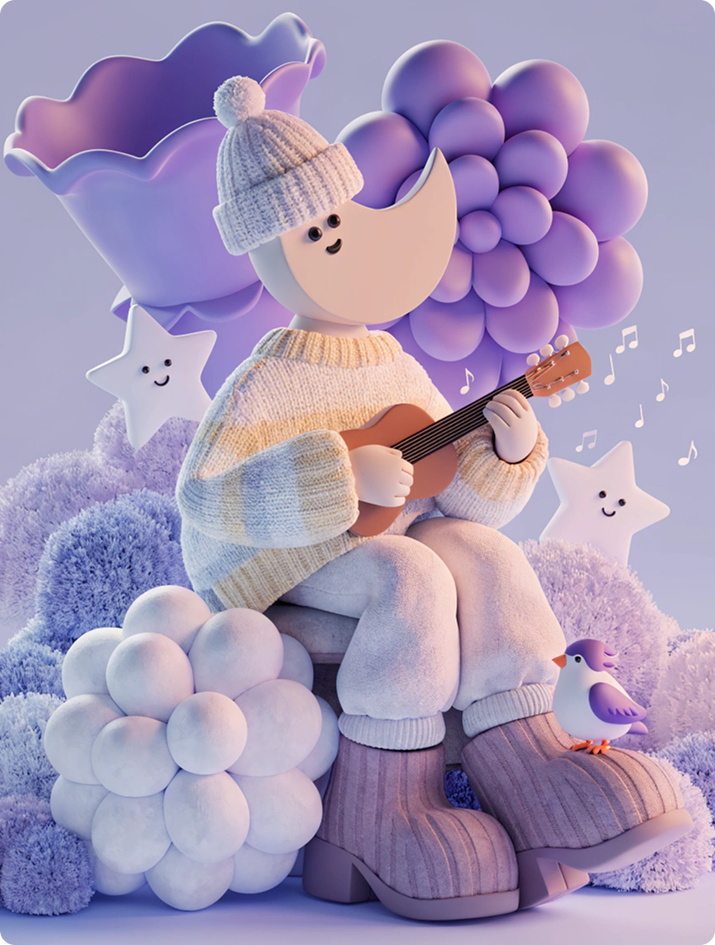
Recraft V4 handles dimensional form with strong material and lighting awareness.
PROMPT (click to expand)
Stylized 3D character with a crescent moon face sitting on a rounded stool playing a tiny guitar surrounded by floating musical notes, oversized flowers, smiling stars, soft bushes, and a tiny bird perched nearby. The character wears oversized knit clothing and chunky boots. Dreamy lavender, blue, and cream palette, matte toy-like textures, soft studio lighting, whimsical storybook-style 3D rendering.
PROMPT (click to expand)
High-detail 3D render of a futuristic modular laboratory device composed of interconnected geometric components, arranged in a clean orthographic composition on a soft light-grey background. The system includes a complex sculptural processing unit with layered asymmetrical shells, rotating mechanical segments, exposed internal structures, and illuminated micro-elements, replacing the liquid chamber. It is combined with a compact interface module featuring tactile sliders and colorful circular indicators, a sculptural ventilation block with perforated surfaces, and a floating ring-shaped connector element, all linked through flexible translucent tubes and metallic joints. Materials are refined and tactile — brushed titanium, frosted acrylic, silicone, matte ceramic, and smoked glass with subtle micro-scratches and soft reflections. Tiny engraved markings, interface symbols, and illuminated indicators add realism and scale. Color palette is pastel and muted — dusty graphite, faded plum, smoky navy, dark sage, muted burgundy, and soft charcoal tones, contrasted with colorful accents in pale orange, muted cyan, butter yellow, soft lavender, and coral red on buttons and interface elements. Soft cinematic studio lighting emphasizes volume, texture, and gentle shadow transitions. Minimal yet visually rich composition, ultra-sharp, noise-free. Style: speculative industrial design, futuristic product visualization, contemporary sci-fi aesthetic.
Prompt structure
Render type (designer toy, cinematic 3D, lookbook)
If you only describe the object, the result is interpretive. If you define the physical system, the result becomes controlled.
Working with text
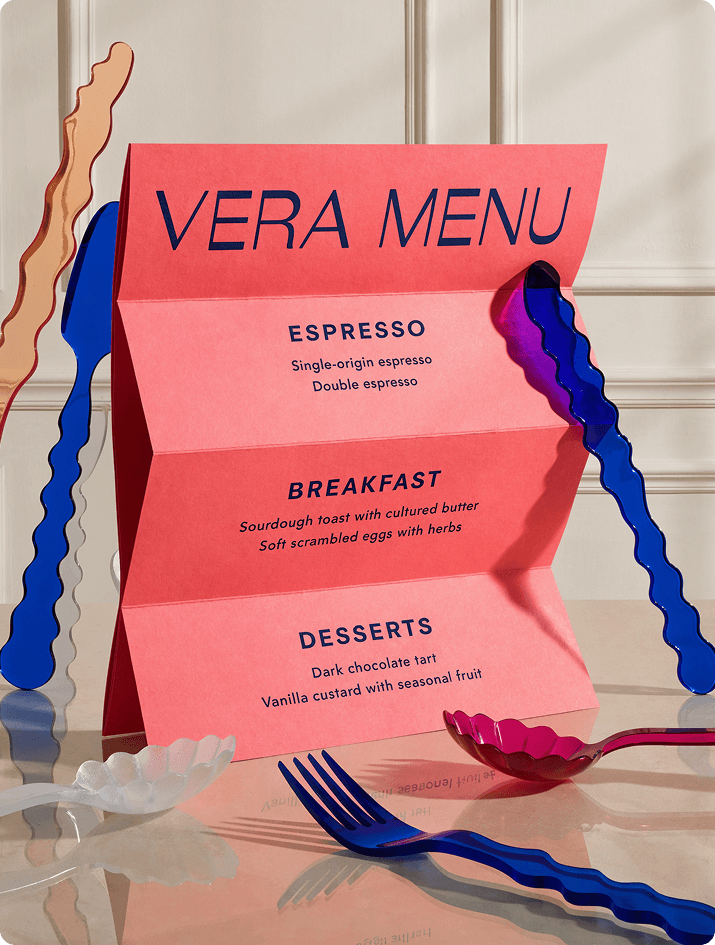
Recraft V4 handles text better than most generative systems, especially when you describe hierarchy.
PROMPT (click to expand)
Bold avant-garde café menu design in a luxury editorial style, photographed in an elevated, design-forward table setting. A large-format folded or partially unfolded menu card dominates the frame as the clear focal point, printed on thick premium matte paper with crisp edges and precise folds, placed on polished stone, lacquered wood, or tinted glass. The headline “VERA MENU” appears oversized and highly legible in an expressive high-fashion sans-serif with sculptural yet clean letterforms. The content is grammatically correct, clearly structured, and professionally written in proper English, with large evenly spaced typography and no filler text: sections such as ESPRESSO (Single-origin espresso, Double espresso), BREAKFAST (Sourdough toast with cultured butter, Soft scrambled eggs with herbs), and DESSERTS (Dark chocolate tart, Vanilla custard with seasonal fruit). Use a vivid high-impact palette — saturated coral, electric pink, deep cobalt blue, warm orange, and creamy off-white — with strong color blocking only, no gradients, and a disciplined typographic hierarchy. Surround the menu with minimal sculptural avant-garde cutlery featuring exaggerated forms and refined finishes. Soft directional editorial lighting creates subtle shadows while keeping the menu surface and typography crisp and fully readable. Overall impression: avant-garde luxury dining where graphic design meets contemporary art — bold, refined, collectible, no real brands, no clutter, focused on scale, clarity, and sculptural composition.
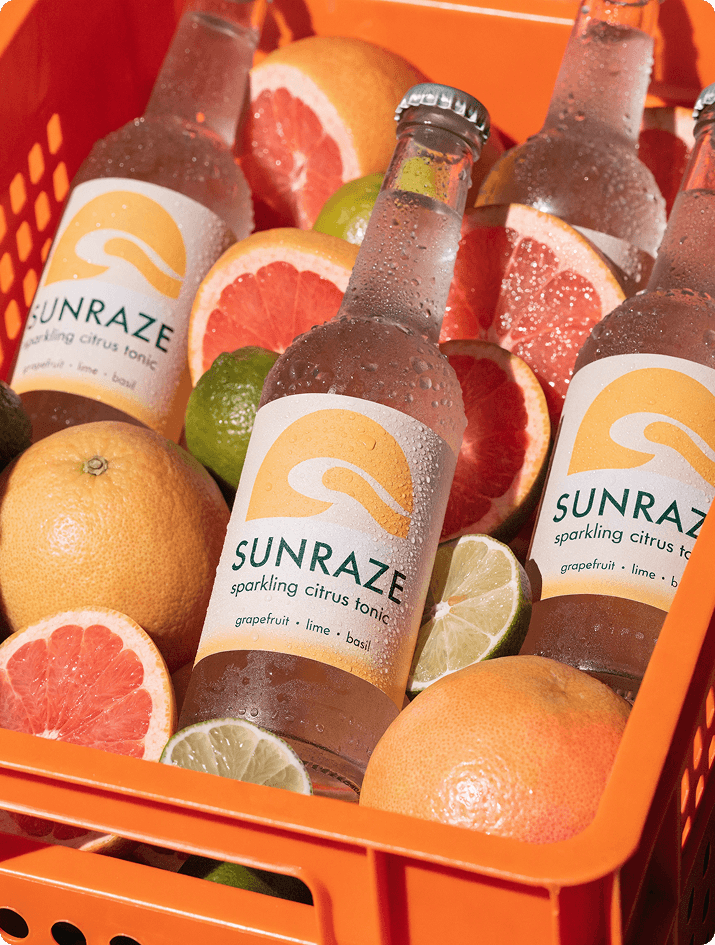
PROMPT (click to expand)
Studio food photography of a premium sparkling beverage in clear glass bottles with matte labels. The bottles are placed diagonally inside a bright orange plastic fruit crate. Around and between the bottles are fresh grapefruits and limes, some cut open with visible juicy pulp and small droplets of moisture.
Minimalist label design featuring a bold graphic symbol of a sun merging with a wave. Text on the label reads: “SUNRAZE”, “sparkling citrus tonic”, “grapefruit · lime · basil”. The label background is soft off-white with warm yellow accents, typography in deep forest green.
Hard directional lighting creates strong shadows from the crate structure. High contrast, detailed citrus skin texture, visible condensation on the glass. Camera angle slightly top-down (about 35°), focus on the central bottle, shallow depth of field. Clean commercial aesthetic, ultra-detailed, sharp focus, natural color grading, high-resolution advertising photography.
Prompt structure
Format type (menu, editorial, packaging, poster)
Primary headline (size + placement)
Secondary hierarchy
Color blocking logic
Print surface and material
Spatial placement
Readability constraints
Place all required text in quotation marks
Define the typographic system — not just the phrase. Quoted text ensures precise text rendering within the layout.
The core principle
Recraft V4 adapts to your level of clarity. Short prompts → model designs with you. Long prompts → model executes your architecture. The model is strong in both modes.
Prompt engineering here is not about verbosity. It’s about defining structure, surface, space, hierarchy, control.
The more intentional your visual thinking, the more consistent and refined your results.
.svg)


.png)
.png)
.png)
.png)

.png)
.png)
.png)


